Streamline driver returns in Walmart stores
I designed a standardized in-app return flow for failed deliveries at Walmart stores. The new flow in GIF (Global Integrated Fulfillment) guides store associates to verify, sort, and reassign returned items efficiently while maintaining quality and reducing errors.
Disclaimer: This case study is a recreation of the original work due to NDA. The content has been modified while preserving the core design challenges, process, and solutions.
Collaborators
UX design, product and engineering
Timeline
Q2 2023 & Q4 2023
Role
Lead designers (1 of 3 designers), responsible for research and end-to-end design

Background
At Walmart, online orders are fulfilled and tracked through the Global Integrated Fulfillment (GIF) system. When a driver initiates a return, the store is notified through GIF and prepares to receive the items. Once the driver arrives, store associates confirm the return in the system, completing the initial handoff. However, each store currently manages the returned items differently after acceptance, but all rely on manual processes which are prone to error.
Driver returns represent 0.18% of total weekly orders, and about 30% of these are re-dispensed. This lack of standardization in handling return leads to inconsistencies, tracking gaps, and inefficiencies, issues that become more pronounced as return volume grows alongside delivery demand.
Testing & iterating
After several rounds of rapid iteration and internal testing, we developed a high-fidelity prototype and prepared to conduct on-site research with store associates to validate our assumptions.
Working alongside two other designers, we interviewed 13 associates across 4 stores and observed how they interacted with the screens while completing the return tasks.
Insights:
-
Most associates expected to see a list of returned items after tapping “Sort returns.”
-
The modal text didn’t clearly communicate the next action and felt disconnected from the “Sort returns” CTA.
-
Although the content on “Sort returns" didn’t match associates’ initial expectations, they were able to understand the information once they viewed the screen.
Recommended action:
Revise the modal text to clearly explain what associates should do on the next screen.
Task #1: Associates to accept a driver return
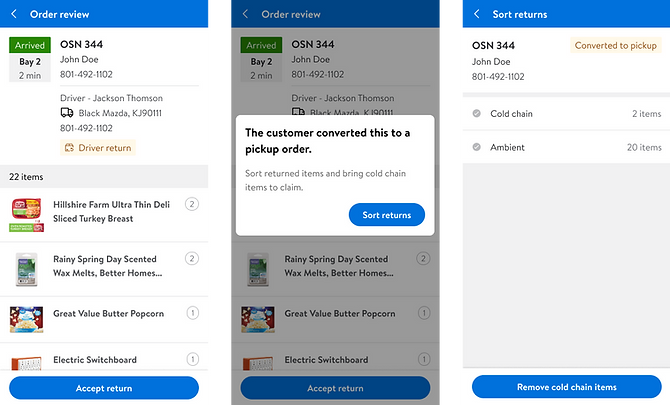
Insights:
-
On the 2nd screen, associates assumed they needed to scan cold-chain items to remove them, consistent with other workflows in the app.
-
The last screen felt unnecessary to most associates — they expected to move directly to sorting ambient items instead.
Recommended actions:
-
Make action copy on the "Sort returns" screen more explicit (e.g., use “Remove cold-chain items” instead of “Cold chain”, and “Sort ambient items” instead of “Ambient”).
-
Introduce scanning to confirm removal of cold-chain items.
-
Remove the last screen and take associates directly to the next task (sorting ambient items).
Task #2: Remove cold chain items from the return

Insights:
-
The majority of associates did not expect to scan items into totes. Instead, they assumed to print tote labels and stage totes directly.
-
However, to ensure item accuracy and prevent missing inventory, each item must be scanned and assigned to a tote so that no empty totes appear in GIF.
Recommended actions:
-
Clarify the scanning requirement with a clear, action-oriented message at the top (e.g., “Scan each item to assign it to a tote”).
-
Emphasize that associates can scan items in any order, not just sequentially as displayed. Or maybe only the items that has been scanned into totes.
-
Introduce friction to prevent associates from bypassing this step.
Task #3: Assign ambient items to totes

Problem statement
There was no standardized process within GIF to manage returned items. As delivery demand grew, the volume of returns also increased, exposing gaps in consistency, inventory tracking, and efficiency across stores.
The goal is to create a systematic, guided in-app return flow that allows store associates to:
-
Audit returned items and identify which items require re-picking
-
Systematically tracking the returned items in the backroom staging shelves
-
Seamlessly trigger the re-pick process in the Picking module if orders are to re-dispensed
This would bridge the gap between dispense and picking in GIF, ensuring quality, consistency, and efficiency.
Goals

The new in-app flow should replace manual notes and verbal communication with guided scanning, automated tracking, and digital re-pick triggers, streamlining the entire return process from acceptance to dispense.
Final designs
Impact
The newly designed in-app return acceptance flow simplifies how associates audit, re-pick, and track returned items. Based on operational estimates from Product and Ops, the new workflow is projected to deliver the following improvements:
Operational standardization
Replaces the manual processes with a consistent digital flow, driving a more reliable associate experience and ultimately improving both driver and customer satisfaction.
Higher order accuracy
System-guided item validation and quantity tracking help reduce missing items and improve accuracy across the 2.5M annual scheduled delivery driver returns.
40% reduction in labor time per order in re-picking
The current paper-based pick process takes approximately 30 minutes, while the new systematic flow is estimated to reduce time to ~18 minutes per order (based on 30 items/order with a 100 items/hr pick rate).

